
Global tax & invoices
Everything you need to effortlessly stay tax-compliant globally, without relying on MoR, ensuring you maintain full control over your business.
- Automatically calculate taxes at checkout.
- Monitor thresholds to avoid unnecessary tax payments.
- Generate automatic tax reports for easy tax settlement.
- Issue and deliver invoices to customers automatically.
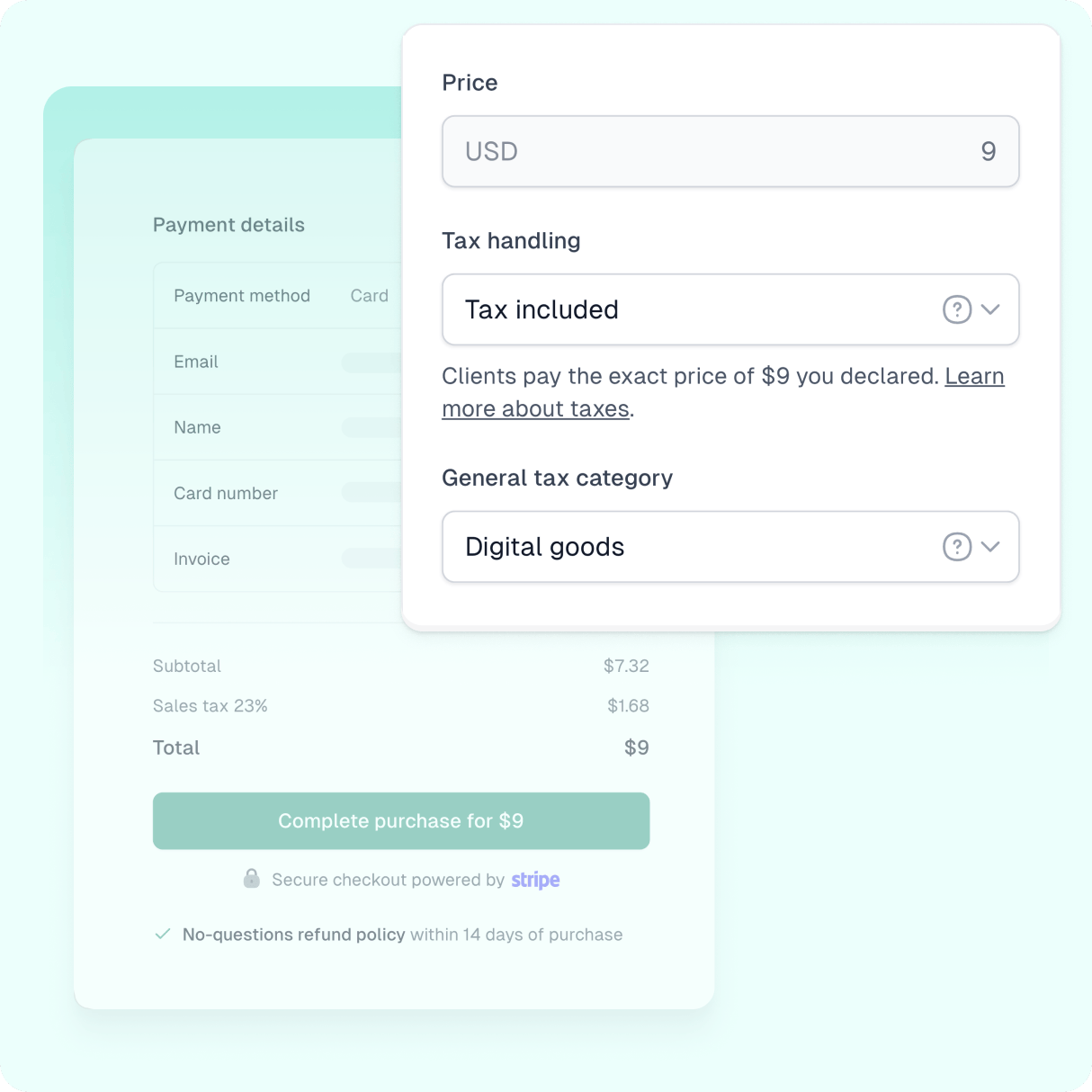
Product demo
See how this feature works
Check out the demo of this feature and try it out for yourself!
Easytools is your solution for managing global sales tax and invoicing on your own – without sacrificing compliance or handing over control of your customer data to MoR. Keep reading to discover how we make it easy.
Select your ideal tax management solution
With Easytools, you have multiple options for managing taxes while selling. It’s entirely up to you to choose the solution that best fits your needs. Here’s a list of available options:
- No Tax & Invoicing (Free) – You take full responsibility for tax handling and invoice delivery.
- Easybilling ($0.50 per transaction) – Our built-in solution handles global invoicing, tax calculation, and billing for you.
- Stripe Tax (Stripe fee: 0.7% per transaction) – Use Stripe’s tax engine for automated tax calculation and invoice generation.
- External Provider – Integrate with supported third-party solutions for tax and invoicing (currently limited to transactions within Poland).
The table below breaks down each option in detail, so you can compare them easily.
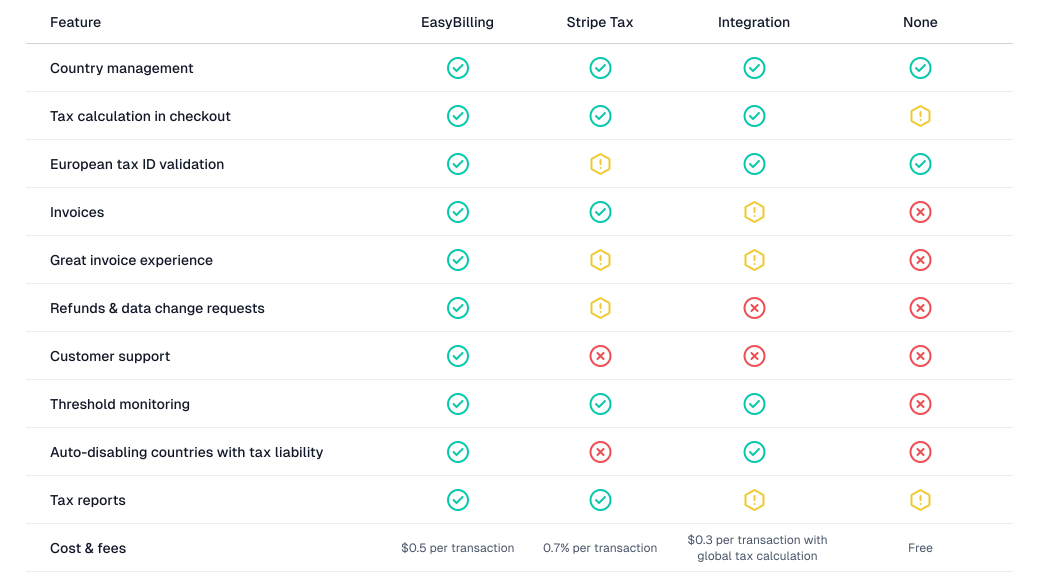
As you can see, no matter which model you choose, you’ll still have access to essential tax features – like setting local tax rates, validating tax IDs, and generating basic tax reports. For more details, check out this article in our documentation.
Accurate tax calculation
When calculating taxes, several factors come into play – such as where your business is registered, your customer’s location, and the type of product you’re selling. These details can vary widely; you might be selling to different countries with distinct tax jurisdictions, targeting your local market, or offering various product types. All these factors significantly influence the tax rate applied at checkout.
The good news is that Easytools can manage these complexities and accurately calculate the tax rate for you. All you need to do is provide some basic information about your sales and business, such as:
- domestic tax rate - a tax rate you normally apply when selling in the country where your business is registered
- general tax category (applicable for international sales only) - the category of product that you sell; you can override this settings at the specific cart level
- registered jurisdictions - countries, where your business is registered to sales tax after passing the threshold
All those settings will be applied globally to all your carts. If you need, you can change the details locally on the checkout level, e.g. choose a different product category for a specific cart.
Thresholds monitoring and management
Some countries require immediate tax registration, while others use thresholds – meaning you only need to register once your income exceeds a set amount (usually annually). In places like the US, it gets more complex, as tax rules vary by state. For example, the most common US threshold is $100,000, but in California, it jumps to $500,000.
Manually tracking all this can be error-prone and stressful. That’s why Easytools enables you to:
- Disable countries with immediate tax obligations
- Auto-disable sales once you hit a threshold
The first option helps you avoid sales (and the need for tax registration) in countries with strict tax requirements. The second keeps you compliant in threshold-based regions where you haven’t surpassed the threshold levels yet.
The best way to illustrate this is with a real-world example:
Let’s say it’s December, and you’re selling online courses. In one of the jurisdictions you are targeting, the threshold is $100,000/year. You’re at $97,000 and planning a new launch. That launch would push you over the limit, triggering tax duties.
With Easytools, you have two smart options:
- Postpone your launch to January, resetting the threshold clock.
- Temporarily disable sales in that region to stay under the limit.
Either way, you stay in control, avoid surprise tax obligations, and make launch decisions strategically – rather than reactively.
Tax details at checkout
The reality is that neither you nor your customers want to be surprised by unexpected tax costs. That’s why it’s important to calculate and clearly display tax information and applicable rates right at checkout. In Easytools, you can choose to use inclusive or exclusive tax options – meaning the tax can either be included in the price or added separately. In both cases, the details of the tax costs will be shown in the checkout summary.
Let’s look at an example to see how these two tax handling models would affect your cart.
Assuming you set your product price at $29.99 for an ebook:
- Tax excluded: The calculated tax cost will be added to the base price.
- Tax included: The tax is already factored into the set price.
And here’s a comparison how both options will appear in your checkout:
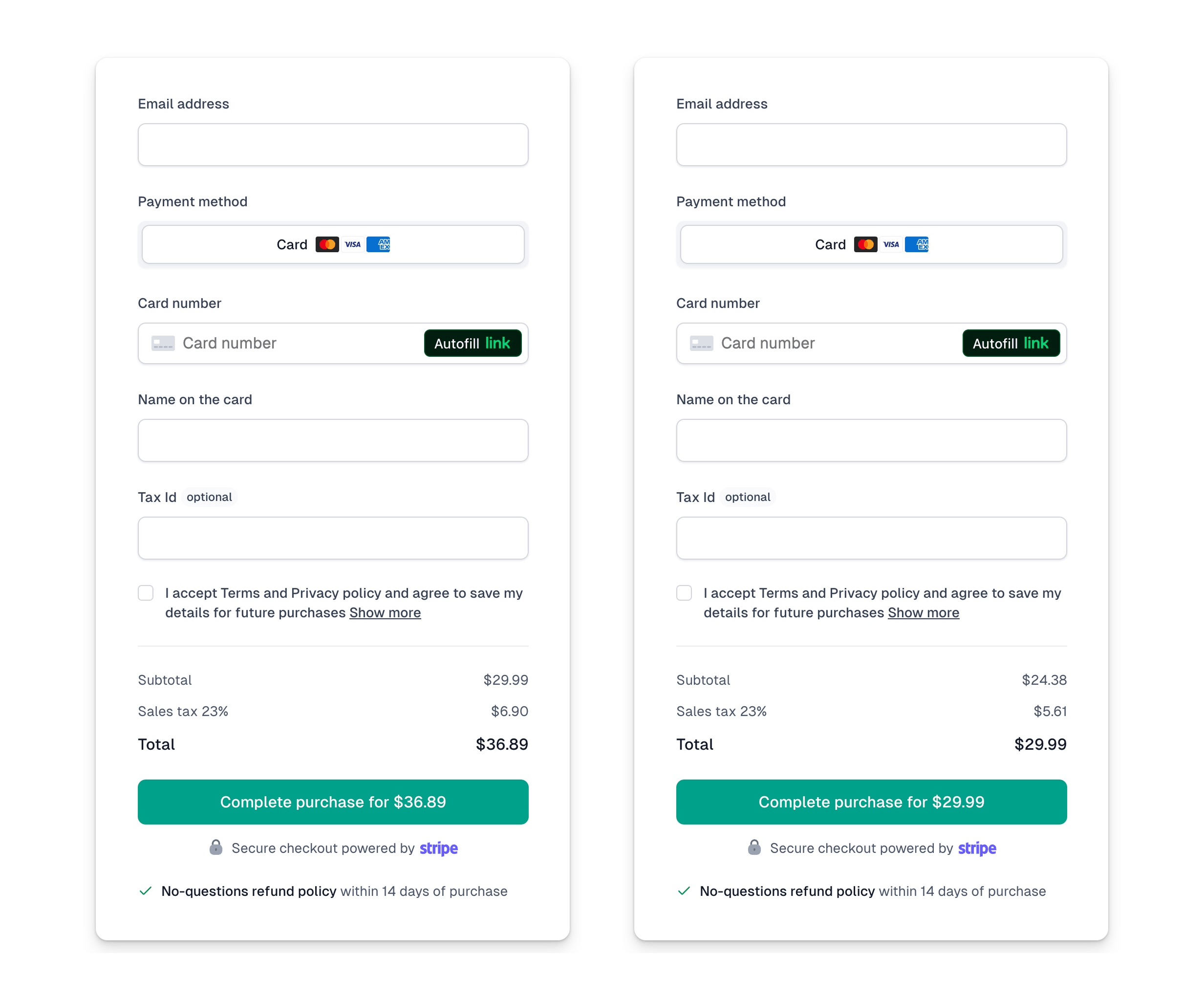
The key element here is that the tax cost is clearly displayed before the customer clicks ‘Purchase.’ This allows them to make an informed decision, knowing exactly how much they will pay upfront. This transparency can significantly boost your conversion rates and prevent cart abandonment, as customers won’t be surprised to find that the price is 23% higher than they initially expected.
Automated billing and invoicing
If you choose our Easybilling service, we’ll take all the billing and invoicing off your hands. In addition to automatically issuing invoices for your customers, we will:
- Deliver the invoice in the purchase confirmation email.
- Add the invoice to the customer portal, allowing customers to manage all their invoices in one place.
- Enable customers to update their invoicing details independently.
- Handle any customer requests, such as returns and data change requests.
This way, you can rest easy knowing your invoicing is error-free and requires no effort on your part. Plus, you can download all issued invoices for a selected period with just one click or generate a sales report.
MoR isn’t always the answer – here’s why
We get it, all this can be quite overwhelming. And that’s exactly so many creators hand their tax manaement over to Merchants of Record. It is indeed a safe (at least usually), and comfortable option, but it comes at come with a high price tag. - and it’s not only the additional MoR fees you need to cover.
When you use an MoR, they’re technically selling your products on your behalf. And that comes with a few major downsides:
- You pay taxes you might not owe – MoRs serve thousands of sellers, so they easily surpass tax thresholds in most countries. That means you’ll be forced to charge and remit taxes even if you wouldn’t have to on your own.
- Their name, not yours, is on the invoice – Your customers are technically buying from them, not you.
- They own the customer data – Which can be a serious limitation if you ever want to switch providers or keep full control over your audience.
- Your money flows through them first – Payouts can be delayed and add unnecessary friction.
Want to dive deeper? Check out this article on why MoR might not be the right fit for you.
At Easytools, we encourage you to explore an alternative approach. We don’t act as a Merchant of Record (MoR); instead, we provide you with straightforward tools to manage taxes – both globally and locally – on your own.
This not only lowers your overall costs but also gives you complete control over your customer data without any lock-in. Everything is securely stored in YOUR Stripe account, so if you ever decide to move on, we’ll be sad to see you go, but we won’t hold you back from transferring your customer data to another tool.
Resources
Learn from our resources

Blog Posts

Guides and ebooks

Workshops

Case studies
FAQ
Here’s what we’re being asked
Have any questions about Easytools? Feel free to browse our list of frequently asked questions below or just drop us a line, we're always here and ready to lend a hand.
What is Easytools?
Easytools is an all‑in‑one platform for creators and solopreneurs who sell digital products. You can build a product page, take payments with a high‑converting checkout, send emails based on purchases, collect testimonials, and deliver your product (including courses) - all from one place.
Does all Easytools features come in one price?
Yes. All features are included in every paid plan, under one subscription. Want to start small? You can use the free plan with checkout access, then upgrade anytime when you’re ready for the full platform. To learn more details, go to our Pricing.
Do I need Stripe to use Easytools?
Yes - to sell through Easytools, you connect Stripe, the safest global payment operator. Easytools runs on top of your Stripe account, which means your payments and customer data stay in Stripe (so you’re not locked in).
Who is Easytools for?
Easytools is for anyone who creates digital products — whether you’re a team of one, a solopreneur, influencer, freelancer, or a growing business. If you want a simple way to sell online (without a complicated tool stack), you’re in the right place.
How fast can I launch my first product?
Fast. You can create your first product in about 5 minutes with our quick setup. If you still need to connect Stripe, you can usually be ready to accept payments the same day (often within an hour).
Do I need tech skills to use Easytools?
Nope. Easytools is 100% no‑code. You set things up with simple, step‑by‑step editors - no developers, no complicated configuration.
Can I cancel Easytools anytime?
Yes - you can cancel anytime. No long‑term contracts and no strings attached. And because Easytools runs on top of your Stripe account, your payments and sales data stay with you in Stripe. So if you ever decide to stop using Easytools, you’re not losing access to your core sales history and customer data.
Can you help me migrate from another platform?
Yes, we're always ready to help! Tell us what you’re using now and what you want to move, and we’ll guide you through the switch.
Can I integrate Easytools with my existing tool stack?
Absolutely! We’re continually expanding our list of native integrations because we believe that using tools you’re familiar with makes your work faster and easier. And if a tool isn’t on our integration list yet, no worries! You can always send your data from Easytools to a webhook and set up advanced automations or integrations using Make or Zapier.
What kind of support do you offer?
You can reach us via chat and email (and book a call when you need it). You also get access to our knowledge base, onboarding help, and weekly sessions - plus a creator community if you want to connect with others.
Take it easy with Easytools
Focus on creating, and let Easytools handle the behind the scenes work.
No coding · No credit card required · Built on Stripe